

[2026] Use Valid New Free EX200 Exam Dumps & Answers
EX200 Braindumps PDF, RedHat EX200 Exam Cram
The RedHat EX200 exam consists of performance-based tasks that require candidates to demonstrate their proficiency in managing and administering Red Hat Enterprise Linux systems. The tasks cover various areas such as file systems and storage management, user and group administration, network configuration, and system security. Candidates are required to complete these tasks within a specific time frame, which puts their time management and decision-making skills to the test.
NEW QUESTION # 14
SIMULATION
The user authentication has been provided by ldap domain in 192.168.0.254. According the following requirements to get ldapuser.
-LdapuserX must be able to login your system, X is your hostname number. But the ldapuser's home directory cannot be mounted, until you realize automatically mount by autofs server.
- All ldap user's password is "password".
Answer:
Explanation:
See explanation below.
Explanation/Reference:
Explanation: system-config-authentication &
NEW QUESTION # 15
Create a 2G swap partition which take effect automatically at boot-start, and it should not affect the original swap partition.
Answer:
Explanation:
see explanation below.
Explanation
# fdisk /dev/sda
p
(check Partition table)
n
(create new partition: press e to create extended partition, press p to create the main partition, and the extended partition is further divided into logical partitions) Enter
+2G t
8 I
82
W
partx -a /dev/sda
partprobe
mkswap /dev/sda8
Copy UUID
swapon -a
vim /etc/fstab
UUID=XXXXX swap swap defaults 0 0
(swapon -s)
NEW QUESTION # 16
Create a compressed archive of /etc and verify its file type.
Answer:
Explanation:
See the solution below in Explanation.
Explanation:
Solution:
tar -zvcf /root/etc_backup.tar.gz /etc
file /root/etc_backup.tar.gz
Detailed Explanation:
* tar creates the archive.
* -z uses gzip compression.
* -v is verbose.
* -c creates the archive.
* -f names the output file.
* file confirms the resulting archive type.
NEW QUESTION # 17
One Package named zsh is dump on ftp://server1.example.com under /pub/updates directory and your FTP server is 192.168.0.254. Install the package zsh.
Answer:
Explanation:
see explanation below.
Explanation
* rpm -ivh ftp://server1/example.com/pub/updates/zsh-*
or
* Login to ftp server : ftp ftp://server1.example.com using anonymous user.
* Change the directory: cd pub and cd updates
* Download the package: mget zsh-*
* Quit from the ftp prompt : bye
* Install the package
* rpm -ivh zsh-*
* Verify either package is installed or not : rpm -q zsh
NEW QUESTION # 18
Create Logical Volume
According to the given requirements, create a new logical volume:
- Logical volume named "mylv" belonging to the volume group "myvg" with a size of 50 extents.
- Extent size of logical volumes in volume group "myvg" should be 16 MiB.
- Format the new logical volume with the VFAT filesystem.
- The logical volume should be automatically mounted at /mnt/mydata during system startup.
Answer:
Explanation:
Solution:
# Check the disk layout
[root@node2 ~]# lsblk
# Partition the disk
[root@node2 ~]# fdisk /dev/vdb
Welcome to fdisk (util-linux 2.37.4).
Changes will remain in memory only, until you decide to write them.
Be careful before using the write command.
Command (m for help): n # Add a new partition
Partition type
p primary (1 primary, 0 extended, 3 free) # Primary partition
e extended (container for logical partitions) # Extended partition
Select (default p): p
Partition number (2-4, default 2): # Press Enter
First sector (1026048-20971519, default 1026048): # Press Enter
***Note: The partition size must be larger than the total size, it should not be exactly equal to. It is recommended to add an extra 200M.
Last sector, +/-sectors or +/-size{K,M,G,T,P} (1026048-20971519, default 20971519): +1200M # Partition size
Created a new partition 2 of type 'Linux' and of size 512 MiB.
Command (m for help): w # Save and exit
The partition table has been altered.
Syncing disks.
# Create volume group and logical volume
[root@node2 ~]# vgcreate -s 16M myvg /dev/vdb4
[root@node2 ~]# lvcreate -l 50 -n mylv myvg
# Install vfat support
[root@node2 ~]# yum provides */mkfs.vfat
[root@node2 ~]# yum -y install dosfstools
# Format the logical volume with vfat filesystem
[root@node2 ~]# mkfs.vfat /dev/myvg/mylv
# Create mount point
[root@node2 ~]# mkdir /mnt/mydata
# Update /etc/fstab for automatic mounting
[root@node2 ~]# vim /etc/fstab
/dev/myvg/mylv /mnt/mydata vfat defaults 0 0
# Mount the logical volume
[root@node2 ~]# mount -a
NEW QUESTION # 19
Configure autofs to automount the home directories of LDAP users as follows:
host.domain11.example.com NFS-exports /home to your system.
This filesystem contains a pre-configured home directory for the user ldapuser11 ldapuser11's home directory is host.domain11.example.com /rhome/ldapuser11 ldapuser11's home directory should be automounted locally beneath /rhome as /rhome/ldapuser11 Home directories must be writable by their users ldapuser11's password is 'password'.
Answer:
Explanation:
see explanation below.
Explanation
* vim /etc/auto.master /rhome /etc/auto.misc
wq!
# vim /etc/auto.misc
ldapuser11 --rw,sync host.domain11.example.com:/rhome/ldpauser11 :wq!
#service autofs restart
* service autofs reload
* chkconfig autofs on
* su -ldapuser11
Login ldapuser with home directory
# exit
NEW QUESTION # 20
CORRECT TEXT
Configure a task: plan to run echo hello command at 14:23 every day.
Answer:
Explanation:
# which echo
# crontab -e
23 14 * * * /bin/echo hello
# crontab -l (Verify)
NEW QUESTION # 21
Configure HTTP service access on a non-standard port 82 and allow it through SELinux and firewalld.
Answer:
Explanation:
See the solution below in Explanation.
Explanation:
Solution:
* Open the firewall port and HTTP service:
firewall-cmd --permanent --add-port=82/tcp
firewall-cmd --permanent --add-service=http
firewall-cmd --reload
* Add SELinux port labeling:
semanage port -a -t http_port_t -p tcp 82
Detailed Explanation:
* firewall-cmd --permanent makes the change persistent.
* --add-port=82/tcp opens the custom TCP port.
* --add-service=http keeps standard HTTP allowed too.
* SELinux blocks services on unexpected ports unless the port is labeled correctly.
* http_port_t tells SELinux that port 82 is valid for web services.
NEW QUESTION # 22
Configure autofs to automount the home directories of LDAP users as follows:
host.domain11.example.com NFS-exports /home to your system.
This filesystem contains a pre-configured home directory for the user ldapuser11 ldapuser11's home directory is host.domain11.example.com /rhome/ldapuser11 ldapuser11's home directory should be automounted locally beneath /rhome as /rhome/ldapuser11 Home directories must be writable by their users ldapuser11's password is 'password'.
Answer:
Explanation:
vim /etc/auto.master /rhome /etc/auto.misc
wq!
# vim /etc/auto.misc
ldapuser11 --rw,sync host.domain11.example.com:/rhome/ldpauser11 :wq!
#service autofs restart
service autofs reload
chkconfig autofs on
su -ldapuser11
Login ldapuser with home directory
# exit
NEW QUESTION # 23
Which section of the Prometheus configuration defines which nodes are monitored?
- A. rules
- B. scrape_config
- C. nodes
- D. listener
- E. targets
Answer: B
Explanation:
Explanation/Reference: https://prometheus.io/docs/prometheus/latest/getting_star
NEW QUESTION # 24
Change the logical volume capacity named vo from 190M to 300M. and the size of the floating range should set between 280 and 320. (This logical volume has been mounted in advance.)
Answer:
Explanation:
# vgdisplay
(Check the capacity of vg, if the capacity is not enough, need to create pv , vgextend , lvextend)
# lvdisplay (Check lv)
# lvextend -L +110M /dev/vg2/lv2
# resize2fs /dev/vg2/lv2
mount -a
(Verify)
------------------------------------------------------------------------------- (Decrease lvm)
# umount /media
# fsck -f /dev/vg2/lv2
# resize2fs -f /dev/vg2/lv2 100M
# lvreduce -L 100M /dev/vg2/lv2
# mount -a
# lvdisplay (Verify)
OR
# e2fsck -f /dev/vg1/lvm02
# resize2fs -f /dev/vg1/lvm02
# mount /dev/vg1/lvm01 /mnt
# lvreduce -L 1G -n /dev/vg1/lvm02
# lvdisplay (Verify)
NEW QUESTION # 25
SIMULATION
Configure the NTP service in your system.
Answer:
Explanation:
See explanation below.
Explanation/Reference:
Explanation: system-config-date &
NEW QUESTION # 26
Find files in /usr/local larger than 3 KB and smaller than 5 KB, copy them to /root/d1, and set SGID on the target directory.
Answer:
Explanation:
See the solution below in Explanation.
Explanation:
Solution:
mkdir -p /root/d1
find /usr/local -type f -size +3k -size -5k -exec cp -rvf {} /root/d1/ \;
chmod g+s /root/d1
ls -ld /root/d1
Detailed Explanation:
* -size +3k means greater than 3 KB.
* -size -5k means less than 5 KB.
* chmod g+s sets the SGID bit on the directory.
* SGID on a directory causes new files created there to inherit the directory's group.
NEW QUESTION # 27
Copy /etc/fstab to /var/tmp name admin, the user1 could read, write and modify it, while user2 without any permission.
Answer:
Explanation:
Answer see in the explanation.
Explanation/Reference:
# cp /etc/fstab /var/tmp/
# chgrp admin /var/tmp/fstab
# setfacl -m u:user1:rwx /var/tmp/fstab
# setfacl -m u:user2:--- /var/tmp/fstab
# ls -l
-rw-rw-r--+ 1 root admin 685 Nov 10 15:29 /var/tmp/fstab
NEW QUESTION # 28
Create Logical Volume
According to the given requirements, create a new logical volume:
- Logical volume named "mylv" belonging to the volume group "myvg" with a size of 50 extents.
- Extent size of logical volumes in volume group "myvg" should be 16 MiB.
- Format the new logical volume with the VFAT filesystem.
- The logical volume should be automatically mounted at /mnt/mydata during system startup.
Answer:
Explanation:
# Check the disk layout
[root@node2 ~]# lsblk
# Partition the disk
[root@node2 ~]# fdisk /dev/vdb
Welcome to fdisk (util-linux 2.37.4).
Changes will remain in memory only, until you decide to write them.
Be careful before using the write command.
Command (m for help): n # Add a new partition
Partition type
p primary (1 primary, 0 extended, 3 free) # Primary partition
e extended (container for logical partitions) # Extended partition
Select (default p): p
Partition number (2-4, default 2): # Press Enter
First sector (1026048-20971519, default 1026048): # Press Enter
***Note: The partition size must be larger than the total size, it should not be exactly equal to. It is recommended to add an extra 200M.
Last sector, +/-sectors or +/-size{K,M,G,T,P} (1026048-20971519, default 20971519): +1200M # Partition size
Created a new partition 2 of type 'Linux' and of size 512 MiB.
Command (m for help): w # Save and exit
The partition table has been altered.
Syncing disks.
# Create volume group and logical volume
[root@node2 ~]# vgcreate -s 16M myvg /dev/vdb4
[root@node2 ~]# lvcreate -l 50 -n mylv myvg
# Install vfat support
[root@node2 ~]# yum provides */mkfs.vfat
[root@node2 ~]# yum -y install dosfstools
# Format the logical volume with vfat filesystem
[root@node2 ~]# mkfs.vfat /dev/myvg/mylv
# Create mount point
[root@node2 ~]# mkdir /mnt/mydata
# Update /etc/fstab for automatic mounting
[root@node2 ~]# vim /etc/fstab
/dev/myvg/mylv /mnt/mydata vfat defaults 0 0
# Mount the logical volume
[root@node2 ~]# mount -a
NEW QUESTION # 29
Locate all the files owned by ira and copy them to the / root/findresults directory.
Answer:
Explanation:
see explanation below.
Explanation
# find / -user ira > /root/findresults (if /root/findfiles is a file)
# mkdir -p /root/findresults
# find / -user ira -exec cp -a {} /root/findresults\; [ if /root/findfiles is a directory] ls /root/findresults
NEW QUESTION # 30
SIMULATION
Upgrade the kernel, start the new kernel by default. kernel download from this address:
ftp://server1.domain10.example.com/pub/update/new.kernel
Answer:
Explanation:
See explanation below.
Explanation/Reference:
Explanation: Download the new kernel file and then install it.
[root@desktop8 Desktop]# ls
kernel-2.6.32-71.7.1.el6.x86_64.rpm
kernel-firmware-2.6.32-71.7.1.el6.noarch.rpm
[root@desktop8 Desktop]# rpm -ivh kernel-*
Preparing... ###########################################
[100%]
1:kernel-firmware
########################################### [ 50%]
2:kernel
########################################### [100%]
Verify the grub.conf file, whether use the new kernel as the default boot. [root@desktop8 Desktop]# cat / boot/grub/grub.conf default=0 title Red Hat Enterprise Linux Server (2.6.32-71.7.1.el6.x86_64) root (hd0,0) kernel /vmlinuz-2.6.32-71.7.1.el6.x86_64 ro root=/dev/mapper/vol0-root rd_LVM_LV=vol0/root rd_NO_LUKS rd_NO_MD rd_NO_DM LANG=en_US.UTF-8 SYSFONT=latarcyrheb-sun16 KEYBOARDTYPE=pc KEYTABLE=us crashkernel=auto rhgb quiet initrd /initramfs-2.6.32-71.7.1.el6.x86_64.img
NEW QUESTION # 31
Configure your Host Name, IP Address, Gateway and DNS.
Host name: dtop5.dn.ws.com
IP Address: 172.28.10.5/4
Gateway: 172.28.10.1
DNS: 172.28.10.1
Answer:
Explanation:
see explanation below.
Explanation
* Configure Host Name
* vim /etc/sysconfig/network NETWORKING=yes HOSTNAME=dtop5.dn.ws.com
GATEWAY=172.28.10.1
2. Configure IP Address, Gateway and DNS
Configure the network by Network Manager:
Note: Please remember to choose two options:
* Connect automatically
* Available to all users
Click "Apply", save and exit, and restart your network services:
# Service network restart
3. Validate these profiles:
a) Check gateway: # vim / etc / sysconfig / network
NETWORKING=yes
HOSTNAME=dtop5.dn.ws.com
GATEWAY=172.28.10.1
b) Check Host Name: # vim /etc/hosts
c) Check DNS: # vim /etc/resolv.conf
# Generated by NetworkManager
Search dn.ws.com
Nameserver 172.28.10.1
d) Check Gateway: # vim /etc/sysconfig/network-scripts/ifcfg-eth0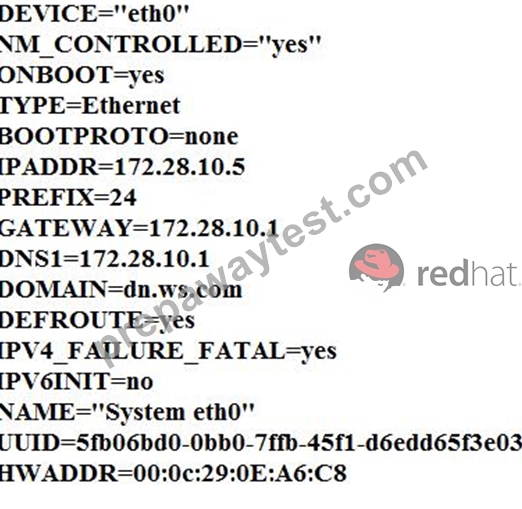
NEW QUESTION # 32
Install dnf-automatic and enable automatic daily update checks.
Answer:
Explanation:
See the solution below in Explanation.
Explanation:
Solution:
dnf install -y dnf-automatic
systemctl enable --now dnf-automatic.timer
systemctl list-timers --all | grep dnf
Detailed Explanation:
* dnf-automatic provides automated update checking and installation features.
* The timer unit schedules the checks.
* RHEL 10 DNF documentation specifically documents the dnf-automatic timer units. ( Red Hat Documentation )
NEW QUESTION # 33
Search a String
Find out all the columns that contains the string seismic within /usr/share/dict/words, then copy all these columns to /root/lines.tx in original order, there is no blank line, all columns must be the accurate copy of the original columns.
Answer:
Explanation:
grep seismic /usr/share/dict/words> /root/lines.txt
NEW QUESTION # 34
......
Feel RedHat EX200 Dumps PDF Will likely be The best Option: https://www.prepawaytest.com/RedHat/EX200-practice-exam-dumps.html
New 2026 EX200 Sample Questions Reliable EX200 Test Engine: https://drive.google.com/open?id=16-OfixUdOK4AqHQFtJlkNkEuUWPvdLfb