

[Jan-2024] Snowflake DEA-C01 Exam: Basic Questions With Answers
New 2024 Realistic Free Snowflake DEA-C01 Exam Dump Questions and Answer
NEW QUESTION # 28
Data Engineer is looking out to delete staged files automatically/periodically when the data is suc-cessfully loaded into tables by the Snowpipe. For achieving the same, which options/command is best suited: [Select 2]
- A. REMOVE_STAGE_FILES option can be set as True in the COPY INTO Command embedded in PIPE objects definition.
- B. PURGE option can be set as True in the COPY INTO Command embedded in PIPE objects definition.
- C. To remove staged files that no longer needed, periodically DELETE command can be executed to delete the files.
- D. To remove staged files that no longer needed, periodically REMOVE command can be executed to delete the files.
Answer: B,D
Explanation:
Explanation
Deleting Staged Files After Snowpipe Loads the Data
Pipe objects do not support the PURGE copy option. Snowpipe cannot delete staged files automat-ically when the data is successfully loaded into tables.
To remove staged files that you no longer need, It is recommended to periodically executing the REMOVE command to delete the files.
Alternatively, configure any lifecycle management features provided by cloud storage service pro-vider.
NEW QUESTION # 29
When created, a stream logically takes an initial snapshot of every row in the source object and the contents of a stream change as DML statements execute on the source table.
A Data Engineer, Sophie Created a view that queries the table and returns the CURRENT_USER and CURRENT_TIMESTAMP values for the query transaction. A Stream has been created on views to capture CDC.
Tony, another user inserted the data e.g.
insert into <table> values (1),(2),(3);
Emily, another user also inserted the data e.g.
insert into <table> values (4),(5),(6);
What will happened when Different user queries the same stream after 1 hour?
- A. All the Six records would be displayed with User 'Sohpie' Who is the owner of the View.
- B. All the 6 records would be shown with METADATA$ACTION as 'INSERT' out of which 3 records would be displayed with username 'Tony' & rest 3 records would be displayed with username 'Emily'.
- C. All the Six Records would be displayed with CURRENT_USER & CUR-RENT_TIMESTAMP while querying Streams.
- D. User would be displayed with the one who queried during the session, but Recorded timestamp would be of past 1 hour i.e. actual records insertion time.
Answer: C
Explanation:
Explanation
When User queries the stream, the stream returns the username for the user. The stream also returns the current timestamp for the query transaction in each row, NOT the timestamp when each row was inserted.
NEW QUESTION # 30
A Data Engineer has created table t1 with datatype VARIANT:
create or replace table t1 (cl variant);
The Engineer has loaded the following JSON data set. which has information about 4 laptop models into the table:
The Engineer now wants to query that data set so that results are shown as normal structured data. The result should be 4 rows and 4 columns without the double quotes surrounding the data elements in the JSON data.
The result should be similar to the use case where the data was selected from a normal relational table z2 where t2 has string data type columns model__id. model, manufacturer, and =iccisi_r.an=. and is queried with the SQL clause select * from t2; Which select command will produce the correct results?
- A.

- B.
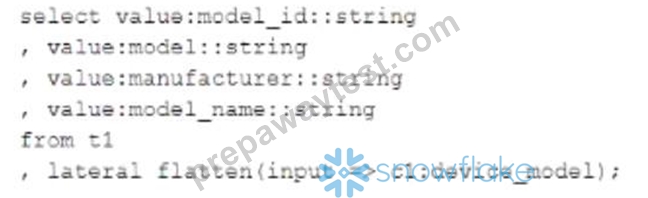
- C.

- D.

Answer: B
NEW QUESTION # 31
A CSV file around 1 TB in size is generated daily on an on-premise server A corresponding table. Internal stage, and file format have already been created in Snowflake to facilitate the data loading process How can the process of bringing the CSV file into Snowflake be automated using the LEAST amount of operational overhead?
- A. On the on premise server schedule a Python file that uses the Snowpark Python library. The Python script will read the CSV data into a DataFrame and generate an insert into statement that will directly load into the table The script will bypass the need to move a file into an internal stage
- B. On the on-premise server schedule a SQL file to run using SnowSQL that executes a PUT to push a specific file to the internal stage. Create a pipe that runs a copy into statement that references the internal stage Snowpipe auto-ingest will automatically load the file from the internal stage when the new file lands in the internal stage.
- C. Create a task in Snowflake that executes once a day and runs a copy into statement that references the internal stage The internal stage will read the files directly from the on-premise server and copy the newest file into the table from the on-premise server to the Snowflake table
- D. On the on-premise server schedule a SQL file to run using SnowSQL that executes a PUT to push a specific file to the internal stage Create a task that executes once a day m Snowflake and runs a OOPY WTO statement that references the internal stage Schedule the task to start after the file lands in the internal stage
Answer: B
Explanation:
Explanation
This option is the best way to automate the process of bringing the CSV file into Snowflake with the least amount of operational overhead. SnowSQL is a command-line tool that can be used to execute SQL statements and scripts on Snowflake. By scheduling a SQL file that executes a PUT command, the CSV file can be pushed from the on-premise server to the internal stage in Snowflake. Then, by creating a pipe that runs a COPY INTO statement that references the internal stage, Snowpipe can automatically load the file from the internal stage into the table when it detects a new file in the stage. This way, there is no need to manually start or monitor a virtual warehouse or task.
NEW QUESTION # 32
A Data Engineer is evaluating the performance of a query in a development environment.
Based on the Query Profile what are some performance tuning options the Engineer can use? (Select TWO)
- A. Add a LIMIT to the ORDER BY If possible
- B. Increase the max cluster count
- C. Use a multi-cluster virtual warehouse with the scaling policy set to standard
- D. Move the query to a larger virtual warehouse
- E. Create indexes to ensure sorted access to data
Answer: A,D
Explanation:
Explanation
The performance tuning options that the Engineer can use based on the Query Profile are:
Add a LIMIT to the ORDER BY If possible: This option will improve performance by reducing the amount of data that needs to be sorted and returned by the query. The ORDER BY clause requires sorting all rows in the input before returning them, which can be expensive and time-consuming. By adding a LIMIT clause, the query can return only a subset of rows that satisfy the order criteria, which can reduce sorting time and network transfer time.
Create indexes to ensure sorted access to data: This option will improve performance by reducing the amount of data that needs to be scanned and filtered by the query. The query contains several predicates on different columns, such as o_orderdate, o_orderpriority, l_shipmode, etc. By creating indexes on these columns, the query can leverage sorted access to data and prune unnecessary micro-partitions or rows that do not match the predicates. This can reduce IO time and processing time.
The other options are not optimal because:
Use a multi-cluster virtual warehouse with the scaling policy set to standard: This option will not improve performance, as the query is already using a multi-cluster virtual warehouse with the scaling policy set to standard. The Query Profile shows that the query is using a 2XL warehouse with 4 clusters and a standard scaling policy, which means that the warehouse can automatically scale up or down based on the load. Changing the warehouse size or the number of clusters will not affect the performance of this query, as it is already using the optimal resources.
Increase the max cluster count: This option will not improve performance, as the query is not limited by the max cluster count. The max cluster count is a parameter that specifies the maximum number of clusters that a multi-cluster virtual warehouse can scale up to. The Query Profile shows that the query is using a 2XL warehouse with 4 clusters and a standard scaling policy, which means that the warehouse can automatically scale up or down based on theload. The default max cluster count for a 2XL warehouse is 10, which means that the warehouse can scale up to 10 clusters if needed. However, the query does not need more than 4 clusters, as it is not CPU-bound or memory-bound. Increasing the max cluster count will not affect the performance of this query, as it will not use more clusters than necessary.
NEW QUESTION # 33
External Function is a type of UDF & can be Scaler or Tabular?
- A. FALSE
- B. TRUE
Answer: A
Explanation:
Explanation
External functions must be scalar functions. A scalar external function returns a single value for each input row.
NEW QUESTION # 34
John, Data Engineer, do have technical requirements to refresh the External tables Metadata period-ically or in auto mode, which approach John can take to meet this technical specification?
- A. Snowflake implicitly take care this Infrastructure needs, as underlying warehouse layer internally manage the refresh. No action needed from John.
- B. John can use AUTO_REFRESH parameter if the underlying External Cloud host sup-ports this for External tables.
- C. External table cannot be scheduled via Snowflake Tasks, 3rd party tools/scripts needs to be used provided by External cloud storage provider.
- D. He can create a task that executes an ALTER EXTERNAL TABLE ... REFRESH statement every 5 minutes.
Answer: B,D
Explanation:
Explanation
Both Option A & B are correct.
For Refreshing External Table Metadata on a Auto Mode, John can use the AUTO_REFRESH pa-rameter properties of External table.When an external table is created, the AUTO_REFRESH pa-rameter is set to TRUE by default.
When an external table is created, the AUTO_REFRESH parameter is set to TRUE by default.
Snowflake recommend that you accept this default value for external tables that reference data files in either Amazon S3 or Microsoft Azure stages.
However, the automatic refresh option is not available currently for external tables that reference Google Cloud Storage stages.
For these external tables, manually refreshing the metadata on a schedule can be useful.
The following example refreshes the metadata for an external table named snowdb.snowschema.snow_ext_table (using ALTER EXTERNAL TABLE ... REFRESH) on a schedule.
-- Create a task that executes an ALTER EXTERNAL TABLE ... REFRESH statement every 5 minutes.
1.CREATE TASK snow_ext_table_refresh_task
2.WAREHOUSE=mywh
3.SCHEDULE='5 minutes'
4.AS
5.ALTER EXTERNAL TABLE snowmydb.snowmyschema.snow_ext_table REFRESH;
NEW QUESTION # 35
Which connector creates the RECORD_CONTENT and RECORD_METADATA columns in the existing Snowflake table while connecting to Snowflake?
- A. Python Connector
- B. Spark Connector
- C. Kafka Connector
- D. Node.js connector
Answer: C
Explanation:
Explanation
Apache Kafka software uses a publish and subscribe model to write and read streams of records, similar to a message queue or enterprise messaging system. Kafka allows processes to read and write messages asynchronously. A subscriber does not need to be connected directly to a publisher; a pub-lisher can queue a message in Kafka for the subscriber to receive later.
An application publishes messages to a topic, and an application subscribes to a topic to receive those messages. Kafka can process, as well as transmit, messages; however, that is outside the scope of this document. Topics can be divided into partitions to increase scalability.
Kafka Connect is a framework for connecting Kafka with external systems, including databases. A Kafka Connect cluster is a separate cluster from the Kafka cluster. The Kafka Connect cluster sup-ports running and scaling out connectors (components that support reading and/or writing between external systems).
The Kafka connector is designed to run in a Kafka Connect cluster to read data from Kafka topics and write the data into Snowflake tables.
Every Snowflake table loaded by the Kafka connector has a schema consisting of two VARIANT columns:
RECORD_CONTENT. This contains the Kafka message.
RECORD_METADATA. This contains metadata about the message, for example, the topic from which the message was read.
NEW QUESTION # 36
Mohan, Data engineer works with ALTUSO Company, wants to programmatically check the status of the query. He needs query id to identify each query executed by Snowflake & using Snowflake Connector for Python to execute a query, how he will be able to meet this requirements. Select the best options you will suggest?
- A. When he used the Snowflake Connector for Python to execute a query, he can access the query ID through the pyqueryid attribute in the Cursor object.
- B. Using python connector, snowflake does not support queryID retrieval for both syn-chronous & asynchronous query.
- C. He can access the query ID through the sfqid attribute in the Cursor object.
1.cur = con.cursor()
2.cur.execute("SELECT * FROM snowtable")
3.print(cur.sfqid) - D. He needs to query history views to get the queryID as best practices.
Answer: C
Explanation:
Explanation
Retrieving the Snowflake Query ID
A query ID identifies each query executed by Snowflake. When you use the Snowflake Connector for Python to execute a query, you can access the query ID through the sfqid attribute in the Cursor object:
1.# Retrieving a Snowflake Query ID
2.cur = con.cursor()
3.cur.execute("SELECT * FROM testtable")
4.print(cur.sfqid)
NEW QUESTION # 37
For enabling non-ACCOUNTADMIN Roles to Perform Data Sharing Tasks, which two glob-al/account privileges snowflake provide?
- A. OPERATE
- B. IMPORT SHARE
- C. CREATE SHARE
- D. REFERENCE USAGE
Answer: B,C
Explanation:
Explanation
CREATE SHARE
In a provider account, this privilege enables creating and managing shares (for sharing data with consumer accounts).
IMPORT SHARE
In a consumer account, this privilege enables viewing the inbound shares shared with the account. Also enables creating databases from inbound shares; requires the global CREATE DATABASE privilege.
By default, these privileges are granted only to the ACCOUNTADMIN role, ensuring that only ac-count administrators can perform these tasks. However, the privileges can be granted to other roles, enabling the tasks to be delegated to other users in the account.
NEW QUESTION # 38
Streams cannot be created to query change data on which of the following objects? [Select All that Apply]
- A. Views, including secure views
- B. External tables
- C. Query Log Tables
- D. Directory tables
- E. Standard tables, including shared tables.
Answer: C
Explanation:
Explanation
Streams supports all the listed objects except Query Log tables.
NEW QUESTION # 39
Snowflake supports using key pair authentication for enhanced authentication security as an alterna-tive to basic authentication (i.e. username and password). Select the list of SnowFlake Clients sup-port the same?
[Select All that Apply]
- A. Go Driver
- B. SnowSQL
- C. SnowCD
- D. Node.js
- E. SnowFlake Connector for Spark
Answer: A,B,D,E
NEW QUESTION # 40
A company built a sales reporting system with Python, connecting to Snowflake using the Python Connector.
Based on the user's selections, the system generates the SQL queries needed to fetch the data for the report First it gets the customers that meet the given query parameters (on average 1000 customer records for each report run) and then it loops the customer records sequentially Inside that loop it runs the generated SQL clause for the current customer to get the detailed data for that customer number from the sales data table When the Data Engineer tested the individual SQL clauses they were fast enough (1 second to get the customers 0 5 second to get the sales data for one customer) but the total runtime of the report is too long How can this situation be improved?
- A. Increase the size of the virtual warehouse
- B. Increase the number of maximum clusters of the virtual warehouse
- C. Rewrite the report to eliminate the use of the loop construct
- D. Define a clustering key for the sales data table
Answer: C
Explanation:
Explanation
This option is the best way to improve the situation, as using a loop construct to run SQL queries for each customer is very inefficient and slow. Instead, the report should be rewritten to use a single SQL query that joins the customer and sales data tables and applies the query parameters as filters. This way, the report can leverage Snowflake's parallel processing and optimization capabilities and reduce the network overhead and latency.
NEW QUESTION # 41
The following code is executed ina Snowflake environment with the default settings:
What will be the result of the select statement?
- A. John
- B. 1John
- C. SQL compilation error object CUSTOMER' does not exist or is not authorized.
- D. 0
Answer: D
NEW QUESTION # 42
What are Common Query Problems a Data Engineer can identified using Query Profiler?
- A. Ineffective Data Sharing
- B. Inefficient Pruning
- C. Queries Too Large to Fit in Memory
- D. "Exploding" Joins i.e Joins resulting due to a "Cartesian product"
Answer: B,C,D
Explanation:
Explanation
"Exploding" Joins
One of the common mistakes SQL users make is joining tables without providing a join condition (resulting in a "Cartesian product"), or providing a condition where records from one table match multiple records from another table. For such queries, the Join operator produces significantly (often by orders of magnitude) more tuples than it consumes.
This can be observed by looking at the number of records produced by a Join operator in the profile interface, and typically is also reflected in Join operator consuming a lot of time.
Queries Too Large to Fit in Memory
For some operations (e.g. duplicate elimination for a huge data set), the amount of memory available for the compute resources used to execute the operation might not be sufficient to hold intermediate results. As a result, the query processing engine will start spilling the data to local disk. If the local disk space is not sufficient, the spilled data is then saved to remote disks.
This spilling can have a profound effect on query performance (especially if remote disk is used for spilling).
Spilling statistics can be checked in Query Profile Interface.
Inefficient Pruning
Snowflake collects rich statistics on data allowing it not to read unnecessary parts of a table based on the query filters. However, for this to have an effect, the data storage order needs to be correlat-ed with the query filter attributes.
The efficiency of pruning can be observed by comparing Partitions scanned and Partitions total sta-tistics in the TableScan operators. If the former is a small fraction of the latter, pruning is efficient. If not, the pruning did not have an effect.
Of course, pruning can only help for queries that actually filter out a significant amount of data. If the pruning statistics do not show data reduction, but there is a Filter operator above TableScan which filters out a number of records, this might signal that a different data organization might be beneficial for this query.
NEW QUESTION # 43
Which use case would be BEST suited for the search optimization service?
- A. Data Scientists who seek specific JOIN statements with large volumes of data
- B. Business users who need fast response times using highly selective filters
- C. Data Engineers who create clustered tables with frequent reads against clustering keys
- D. Analysts who need to perform aggregates over high cardinality columns
Answer: B
Explanation:
Explanation
The use case that would be best suited for the search optimization service is business users who need fast response times using highly selective filters. The search optimization service is a feature that enables faster queries on tables with high cardinality columns by creating inverted indexes on those columns. High cardinality columns are columns that have a large number of distinct values, such as customer IDs, product SKUs, or email addresses. Queries that use highly selective filters on high cardinality columns can benefit from the search optimization service because they can quickly locate the relevant rows without scanning the entire table. The other options are not best suited for the search optimization service. Option A is incorrect because analysts who need to perform aggregates over high cardinality columns will not benefit from the search optimization service, as they will still need to scan all the rows that match the filter criteria. Option C is incorrect because data scientists who seek specific JOIN statements with large volumes of data will not benefit from the search optimization service, as they will still need to perform join operations that may involve shuffling or sorting data across nodes. Option D is incorrect because data engineers who create clustered tables with frequent reads against clustering keys will not benefit from the search optimization service, as they already have an efficient way to organize and access data based on clustering keys.
NEW QUESTION # 44
......
Guaranteed Success in SnowPro Advanced DEA-C01 Exam Dumps: https://www.prepawaytest.com/Snowflake/DEA-C01-practice-exam-dumps.html
DEA-C01 Practice Test Engine: Try These 67 Exam Questions: https://drive.google.com/open?id=1ElVbou-NKyW-30hEus16KXPbvrt0GLxj