070-697 Deutsch exam dumps

Microsoft 070-697 Deutsch Value Package

(Include: PDF + Desktop Test Engine + Online Test Engine)

  • Exam Code: 070-697 Deutsch
  • Exam Name: Configuring Windows 10 Devices (070-697 Deutsch Version)
  • No. of Questions: 340 Questions and Answers
  • Updated: Nov 16, 2026

070-697 Deutsch Free Demo download

Instant Download: Upon successful payment, Our systems will automatically send the product you have purchased to your mailbox by email. (If not received within 12 hours, please contact us. Note: don't forget to check your spam.)

Download Demo

Custom purchase

Choosing Purchase: "Online Test Engine"
Price: $79.98 
  • Best exam practice material
  • Three formats are optional
  • 10 years of excellence
  • 365 Days Free Updates
  • Learn anywhere, anytime
  • 100% Safe shopping experience

100% Money Back Guarantee

PrepAwayTest has an unprecedented 99.6% first time pass rate among our customers. We're so confident of our products that we provide no hassle product exchange.

Failing the 070-697 Deutsch exam means paying the registration fee all over again. Preparing with the 340 up-to-date practice questions from PrepAwayTest is by far the cheaper route to your Microsoft Configuring Windows 10 Devices (070-697 Deutsch Version).

Microsoft 070-697 Deutsch Exam Overview:

Certification Vendor:Microsoft
Exam Name:Configuring Windows Devices
Exam Number:70-697
Exam Duration:120-150
Available Languages:English, Portuguese (Brazil), Japanese, Chinese (Simplified), German, Chinese (Traditional), French
Passing Score:700/1000
Exam Format:Simulation, Drag and Drop, Multiple Response, Build List, Hot Area, Case Study, Multiple Choice
Exam Price:USD 165
Real Exam Qty:40-60
Related Certifications:MCSA: Windows 10
Certificate Validity Period:Retired
Sample Questions: DOWNLOAD DEMO
Exam Way:Computer-based exam delivered through Pearson VUE testing centers and online proctored testing (when available).
Pre Condition:No formal prerequisite exam. Candidates typically first passed Exam 70-698 (Installing and Configuring Windows 10) to earn the MCSA: Windows 10 certification.
Official Syllabus URL:https://learn.microsoft.com/en-us/credentials/certifications/exams/70-697/

Microsoft 070-697 Deutsch Exam Syllabus Topics:

SectionWeightObjectives
Manage Data Access and Protection15-20%- Protect data
  • 1. Configure BitLocker
  • 2. Configure Encrypting File System (EFS)
  • 3. Implement Information Protection
- Manage access
  • 1. Configure Work Folders
  • 2. Manage shared resources
  • 3. Configure Dynamic Access Control
Manage Windows Store and Cloud Services10-15%- Manage applications
  • 1. Manage application updates
  • 2. Configure sideloading
  • 3. Deploy Windows Store apps
- Manage cloud services
  • 1. Integrate with Microsoft 365 services
  • 2. Configure OneDrive for Business
  • 3. Manage Azure-based services
Manage Connectivity10-15%- Manage networking
  • 1. Configure network security
  • 2. Configure DNS settings
  • 3. Manage wireless networking
- Configure remote access
  • 1. Configure VPN
  • 2. Implement DirectAccess
  • 3. Configure Remote Desktop
Manage Identity15-20%- Manage authentication
  • 1. Implement Multi-Factor Authentication
  • 2. Configure certificate-based authentication
  • 3. Configure Windows Hello for Business
- Manage Azure Active Directory identities
  • 1. Configure Azure AD Join
  • 2. Implement self-service password reset
  • 3. Manage users and groups
Manage Device Management35-40%- Manage device deployment
  • 1. Deploy Windows 10 using Windows Deployment Services
  • 2. Configure provisioning packages
  • 3. Manage updates and servicing
- Manage Group Policy
  • 1. Configure Group Policy settings
  • 2. Manage administrative templates
  • 3. Implement policy-based management
- Implement mobile device management
  • 1. Enroll devices
  • 2. Manage compliance policies
  • 3. Configure Microsoft Intune

Common Questions About the Microsoft 070-697 Deutsch Exam

The Microsoft Configuring Windows 10 Devices (070-697 Deutsch Version) is the official Microsoft exam that leads to the MCSA: Windows 10 certification at the Associate level. Passing it validates your skills against Microsoft standards and proves your qualification to current and future employers. The credential is also connected with related certifications such as MCSA: Windows 10, so it can serve as a solid step in a broader certification path.

The 070-697 Deutsch exam has 40-60 questions in total and must be completed within 120-150. That leaves only a narrow time budget per item, so train yourself to flag a difficult question, move on, and circle back later instead of getting stuck. A week or two before your test date, run at least one full timed mock exam in the PrepAwayTest desktop or online test engine under the same 120-150 limit, and repeat until you can finish with a few minutes left for review.

The passing score for the 070-697 Deutsch exam is 700/1000, and the official registration fee is USD 165. Keep in mind that a failed attempt is not discounted — retaking the exam means paying the full fee again — so it is wise not to book your seat until your practice scores sit comfortably above the passing mark. Working through the 340 questions at PrepAwayTest in timed mode is a reliable way to judge when you are truly ready.

Microsoft sets the following requirement for the 070-697 Deutsch exam: No formal prerequisite exam. Candidates typically first passed Exam 70-698 (Installing and Configuring Windows 10) to earn the MCSA: Windows 10 certification.. Eligibility rules can change from time to time, so always confirm the current prerequisites on the official exam page at https://learn.microsoft.com/en-us/credentials/certifications/exams/70-697/ before you register.

Yes. PrepAwayTest offers a free PDF demo for the Microsoft Configuring Windows 10 Devices (070-697 Deutsch Version), so you can review real sample questions and judge the quality before paying anything. After your purchase, you receive 365 days of free updates — whenever the question pool changes, you get the latest version at no cost. Once that period expires, you can extend your update service at a 50% discount from your member zone.

If you take the 070-697 Deutsch exam within 60 days of your purchase and do not pass, you can apply for a full refund under our 100% Money Back Guarantee. To qualify, submit a scanned copy of your exam enrollment slip together with your official Score Report (PDF) within 2 days after the exam date, and your claim will be processed within 7 days. Note that the guarantee applies only to the corresponding exam: attempts taken within 3 days of purchase, downloaded-but-unused materials, free resources, and expired orders are not eligible, and the candidate name must match the purchaser name. If you would rather not refund, you can exchange the product for two free exam products of equal value while keeping the update service on your original purchase.

Delivery is instant: your files are available to download right after payment and are also sent to your email within one minute. If nothing arrives within 2 hours, contact our support team (and check your spam folder first). There is no limit on the number of computers you can install the product on.

The Microsoft Configuring Windows 10 Devices (070-697 Deutsch Version) is organized into 5 domains. Among the first ones are Manage Windows Store and Cloud Services (10-15%), Manage Device Management (35-40%), Manage Data Access and Protection (15-20%), and the remaining domains cover the rest of the official objectives. For the complete topic breakdown with every subtopic, see the full 070-697 Deutsch exam outline above on this page.

Microsoft Configuring Windows 10 Devices (070-697 Deutsch Version) Sample Questions:

Auf den Computern in der Finanzabteilung Ihres Unternehmens wird Windows XP Professional ausgeführt. Auf diesen Computern sind mehrere Branchenanwendungen (LOB) installiert.
Sie fügen einen neuen Windows 10 Enterprise-Computer in der Finanzabteilung hinzu. Sie stellen fest, dass eine von der Finanzabteilung verwendete Anwendung auf diesem Computer nicht funktioniert.
Sie müssen die Anwendung auf dem neuen Computer ausführen.
Was solltest du zuerst tun?

  • A. Installieren Sie Client Hyper-V.
  • B. Führen Sie Aktualisieren Sie Ihren PC.
  • C. Erstellen Sie einen Windows To Go-Arbeitsbereich.
  • D. Installieren Sie den Windows XP-Modus.
Reveal Solution  Discussion  0

Correct Answer: A  🗳️

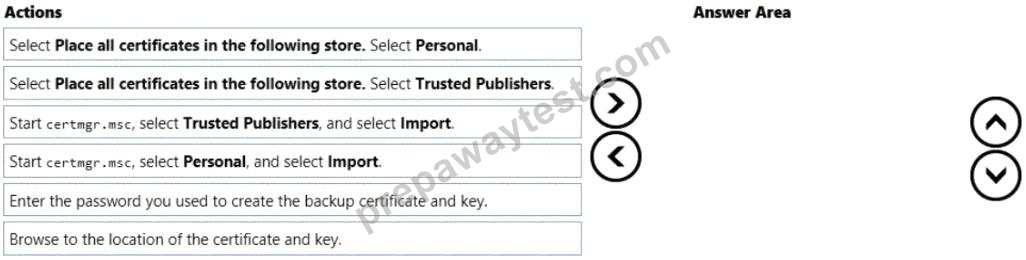
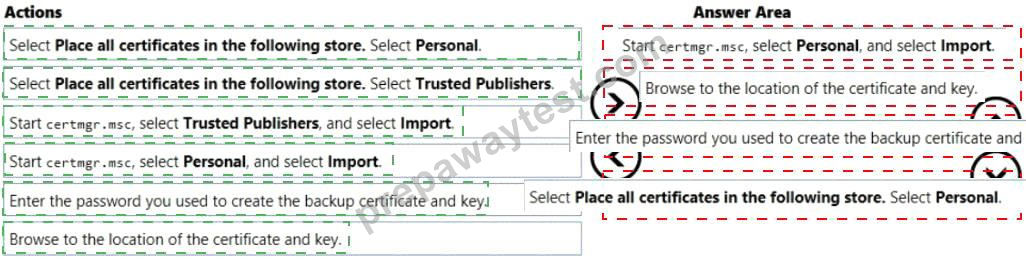
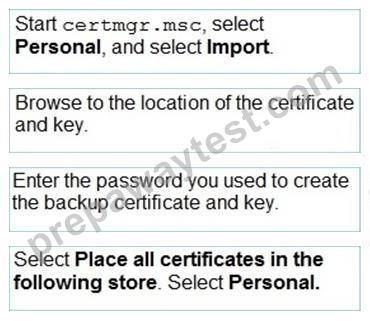
Ein Windows 10 Enterprise-Computer verfügt über eine externe Festplatte, die ausgewählte Ordner enthält, die mit EFS verschlüsselt wurden. Die interne Festplatte des Computers fällt aus.
Sie haben eine Sicherungskopie des Zertifikats und des Schlüssels.
Sie müssen Zugriff auf die verschlüsselten Ordner auf der externen Festplatte gewähren.
Welche vier Aktionen sollten Sie nacheinander ausführen? Verschieben Sie zum Beantworten die entsprechenden vier Aktionen aus der Liste der Aktionen in den Antwortbereich und ordnen Sie sie in der richtigen Reihenfolge an.

Reveal Solution  Discussion  0

Correct Answer:


Erläuterung

Sie unterstützen Desktop-Computer und Tablets, auf denen Windows 8 Enterprise ausgeführt wird. Alle Computer können mithilfe von DirectAccess über das Internet eine Verbindung zu Ihrem Unternehmensnetzwerk herstellen.
Ihr Unternehmen möchte eine neue Anwendung auf den Tablets bereitstellen. Die Bereitstellungslösung muss die folgenden Anforderungen erfüllen:
* Auf die Anwendung kann nicht zugegriffen werden, wenn ein Benutzer offline arbeitet
* Die Anwendung ist auf einem internen Solid-State-Laufwerk (SSD) auf den Tablets gespeichert
* Die Anwendung ist von anderen Anwendungen isoliert
* Die Anwendung belegt den geringsten Speicherplatz
Sie müssen die neue Anwendung auf den Tablets bereitstellen.
Was tun?

  • A. Installieren Sie die Anwendung in einer separaten Windows 8-Installation in einer VHDX-Datei. Konfigurieren Sie Tablets mit Dual Boot.
  • B. Stellen Sie die Anwendung als Application Virtualization (App-V) -Paket bereit. Installieren Sie den App-V 4.6-Client auf den Tablets.
  • C. Stellen Sie die Anwendung als veröffentlichte Anwendung auf dem Remotedesktop-Server bereit. Erstellen Sie eine Remotedesktopverbindung auf den Tablets.
  • D. Installieren Sie die Anwendung in einer separaten Windows 8-Installation auf einer virtuellen Festplatte (VHD).
    Konfigurieren Sie die Tablets mit Dual Boot.
  • E. Veröffentlichen Sie die Anwendung im Windows Store.
  • F. Installieren Sie die Anwendung auf einem lokalen Laufwerk auf den Tablets.
  • G. Installieren Sie die Anwendung in einem Windows To Go-Arbeitsbereich.
  • H. Installieren Sie Hyper-V auf Tablets. Installieren Sie die Anwendung auf einer virtuellen Maschine.
Reveal Solution  Discussion  0

Correct Answer: C  🗳️

Explanation: Only visible for PrepAwayTest members. You can sign-up / login (it's free).

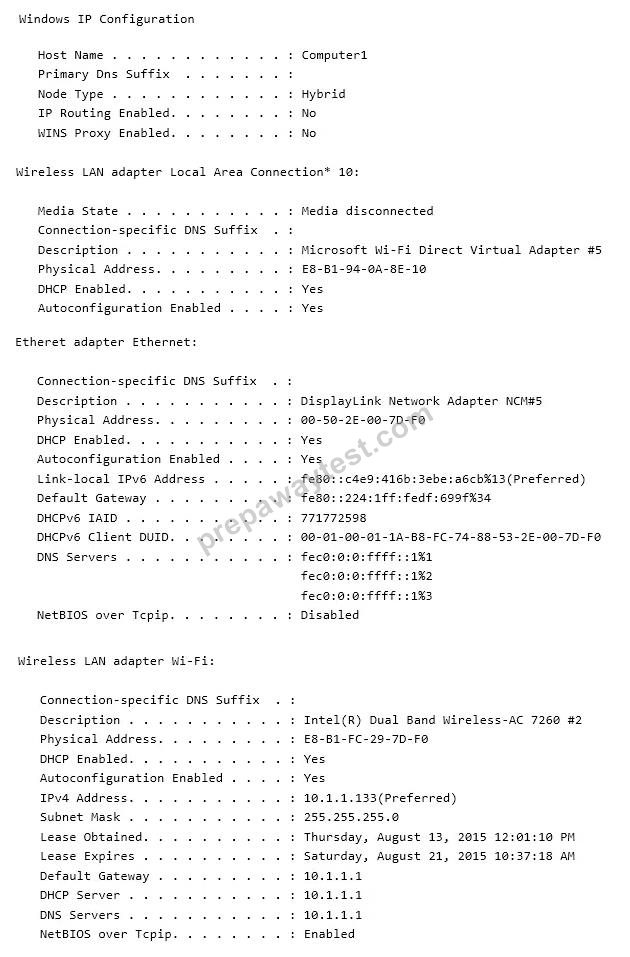
Sie haben ein Netzwerk, das Windows 10 Enterprise-Computer enthält.
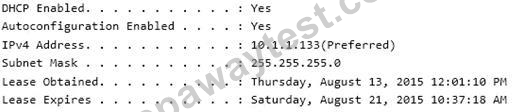
Die Netzwerkkonfiguration eines der Computer wird in der folgenden Ausgabe angezeigt.

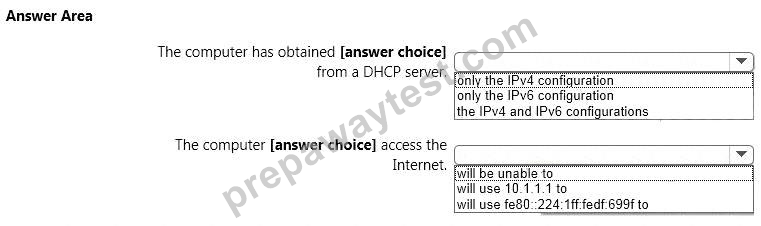
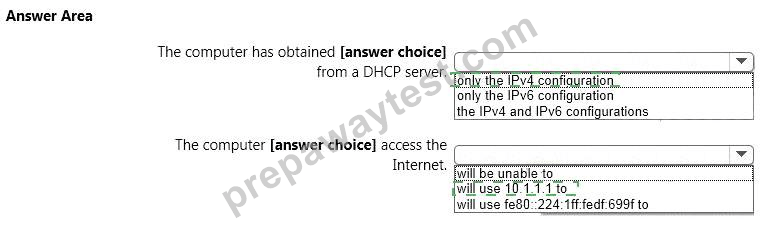
Verwenden Sie die Dropdown-Menüs, um die Antwortauswahl auszuwählen, die jede Anweisung auf der Grundlage der in der Ausgabe angezeigten Informationen vervollständigt.
HINWEIS: Jede richtige Auswahl ist einen Punkt wert.

Reveal Solution  Discussion  0

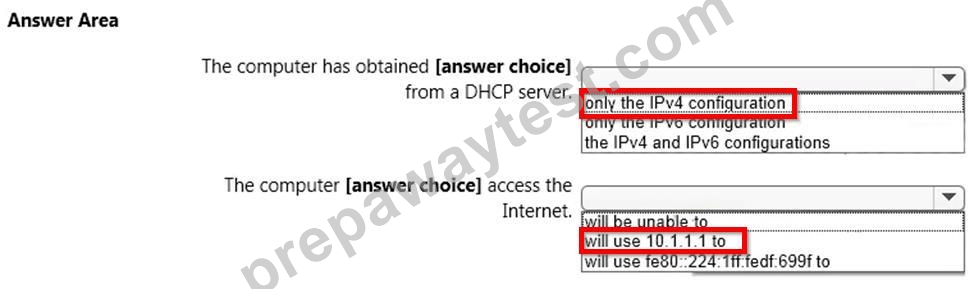
Correct Answer:


Erläuterung

Das folgende Exponat zeigt, dass der Computer seine IPv4-Adresse von einem DHCP-Server bezogen hat. Außerdem wird angezeigt, wann die DHCP-Lease erhalten wurde und wann sie abläuft.

Die unten gezeigte IPv6-Adresse beginnt mit 'fe80'. Dies ist eine Adresse für die automatische Konfiguration, keine Adresse, die von einem DHCP-Server bezogen wurde.

Die IP-Adresse des Standard-Gateways lautet 10.1.1.1

Ein Unternehmen verfügt über Windows 10 Enterprise-Clientcomputer. Ein Clientcomputer mit dem Namen COMPUTER1 verfügt über einen freigegebenen Ordner mit dem Namen Folder1, der sich im Downloads-Ordner des Benutzers befindet. Ordner1 wird nur für Mitarbeiter der Marketingabteilung freigegeben. Alle Marketing-Mitarbeiter können von ihren Client-Computern aus eine Verbindung zu Folder1 herstellen.
Ein Marketingmitarbeiter kann von einem älteren Gerät, das nicht mit den Windows 10 Enterprise-Standardfreigabeeinstellungen kompatibel ist, keine Verbindung zu Ordner1 herstellen. Das Gerät kann eine Verbindung zu Ressourcen auf anderen Clientcomputern herstellen.
Sie müssen COMPUTER1 so konfigurieren, dass das Gerät eine Verbindung zu Folder1 herstellen kann.
Welche Einstellung solltest du aktivieren?

  • A. Kennwortgeschützte Freigabe deaktivieren
  • B. Deaktivieren Sie die Netzwerkerkennung
  • C. Aktivieren Sie die Dateifreigabe für Geräte, die eine 40- oder 56-Bit-Verschlüsselung verwenden
  • D. Aktivieren Sie die Freigabe, damit alle Benutzer mit Netzwerkzugriff Dateien in den Öffentlichen Ordnern lesen und schreiben können.
  • E. Verwenden Sie eine 128-Bit-Verschlüsselung, um Dateifreigabeverbindungen zu schützen
Reveal Solution  Discussion  0

Correct Answer: C  🗳️

Explanation: Only visible for PrepAwayTest members. You can sign-up / login (it's free).

Viewing page 1 out of 68 pages.
Viewing questions 1-5 out of 340 questions.

1%

0 Customer ReviewsCustomers Feedback (* Some similar or old comments have been hidden.)

LEAVE A REPLY

Your email address will not be published. Required fields are marked *


Related Exams

0
0
0
0

Contact Us

If you have any question please leave me your email address, we will reply and send email to you in 12 hours.

Our Working Time: ( GMT 0:00-15:00 )
From Monday to Saturday

Support: Contact now